

There is a specific feeling of dread that every product designer knows. It happens when you’re standing on the shop floor, watching the machine cycle. The sheet heats up, the mold raises, the vacuum pulls tight, it looks perfect. Then, the operator hits “release.”
And nothing happens.
The part is seized onto the tool. The plastic cools and shrinks, locking onto the mold like a vice. You don’t just have a failed prototype; you have a piece of tooling that needs to be pried apart with a crowbar, potentially ruining thousands of dollars of aluminum in seconds.
At BLG Fiberglass Manufacturing, we see this happen too often with client-supplied designs. The culprit is almost always the same: insufficient wall slope or accidental geometric overhangs.
While we offer alternative processes like RTM (Resin Transfer Molding) or SMC for complex geometries, the Heavy Gauge Vacuum Forming remains the most cost-effective choice for large plastic components if you design it right. Here is our shop-floor-proven guide to getting your draft angles and undercuts right the first time.
Rule 1: Master the Male vs. Female Draft Distinction
Most design guides will lazily tell you to “add 3 degrees of draft.” That is dangerous advice because it ignores the fundamental physics of how plastic shrinks.
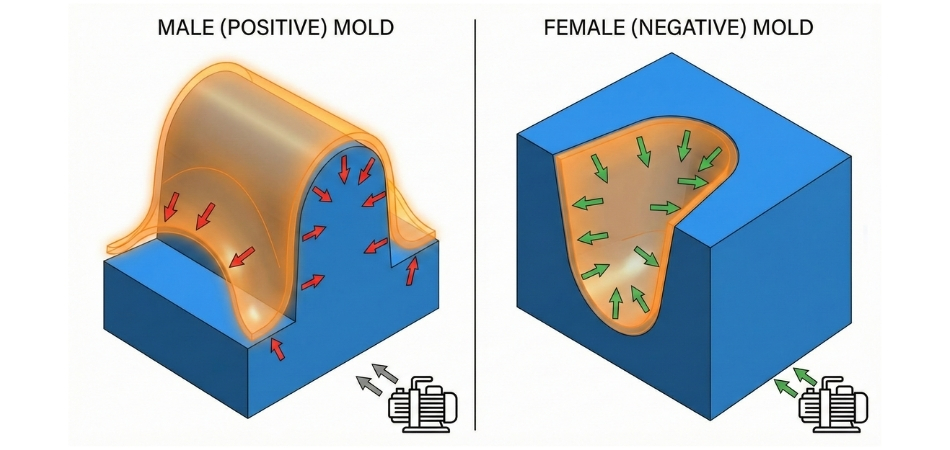
You need to treat Male (positive) and Female (negative) molds differently.
The Physics of Shrinkage
When plastic enters the rubbery state and is formed, it eventually cools. As it cools, it shrinks.
- On a Male Mold (a protrusion): The plastic shrinks onto the mold. It tightens its grip.
- On a Female Mold (a cavity): The plastic shrinks away from the mold walls.
The Expert Recommendation:
- Male Molds: You need more taper here because the material is fighting you. We recommend a minimum of 5° to 7° for deep draw parts. If you have vertical walls with zero draft on a male mold, you will create a vacuum lock that no amount of release agent can fix.
- Female Molds: Since the material pulls away from the wall, you can be more aggressive. 2° to 3° is usually standard here. In some cosmetic applications where vertical walls are crucial, 1.5° can work if the surface is polished.
Vacuum forming (thermoforming) is deceptively simple, but it is unforgiving of geometry errors. Unlike injection molding, where you have high pressure to force material around, vacuum forming relies on atmospheric pressure and material stretch. If you don’t design for the release, you are designing for failure.
Rule 2: Beware the “Implicit Undercut” (And How We Catch It)
We all know what an obvious undercut looks like a hook or a lip that prevents the tool from pulling straight out. But the most dangerous die-locks are the ones you don’t see until it’s too late. I call these “Implicit Undercuts.”
These usually happen when complex organic shapes like those found in automotive or marine components look vertical in CAD but actually dip back inwards by half a degree.
The Fix: Pattern Development & 3D Digitization
This is why Pattern Development (3D Digitization) is a critical step in our process at BLG. Before we cut a single block of metal, we run a draft analysis on your file.
- The Warped Geometry: Sometimes a surface that looks straight in CAD is actually creating a mechanical lock.
- The Thick Sheet Problem: Remember that in vacuum forming, you are forming a sheet with thickness. If you choose the right thermoplastic sheet but fail to account for the heavy gauge (0.125″ or thicker), a tight corner on the outside might create a “keyhole” effect on the inside radius of the part.
Pro Tip: It is much cheaper to fix a pixel than to fix an aluminum mold. Always run a Draft Analysis in SolidWorks or Fusion 360 before finalizing your design.
Rule 3: Texture Tax Add 1° Per 0.001″ of Depth
You want that nice textured finish on your part. It looks great, but texture is essentially thousands of tiny interference features.
If you sandblast a vertical wall and then try to pull a vacuum formed part off it, the plastic fills those microscopic pits. When you try to demold, you aren’t sliding the part off; you are shearing plastic. This leads to “drag marks” ugly white streaks up the side of your part.
The Golden Formula: For every 0.001 inch (0.025 mm) of texture depth, you must add 1° to 1.5° of EXTRA draft.
Example: Base draft 4° + Texture Tax 3° = 7° Total Draft Required.
If you cannot accommodate that extra angle, you have two options:
- Remove the texture.
- Talk to us about Painting (Primer/Top). At BLG, we can apply the surface finish as a post-process, allowing you to keep the mold simple and the release clean.
Rule 4: Handling Undercuts (The “Cheat” Codes)
Sometimes, you need a geometric overhang. Maybe it’s for a mounting bracket, a snap-fit, or a complex handle. In thermoforming, you have three options, and at BLG, we specialize in the third one to save you money.
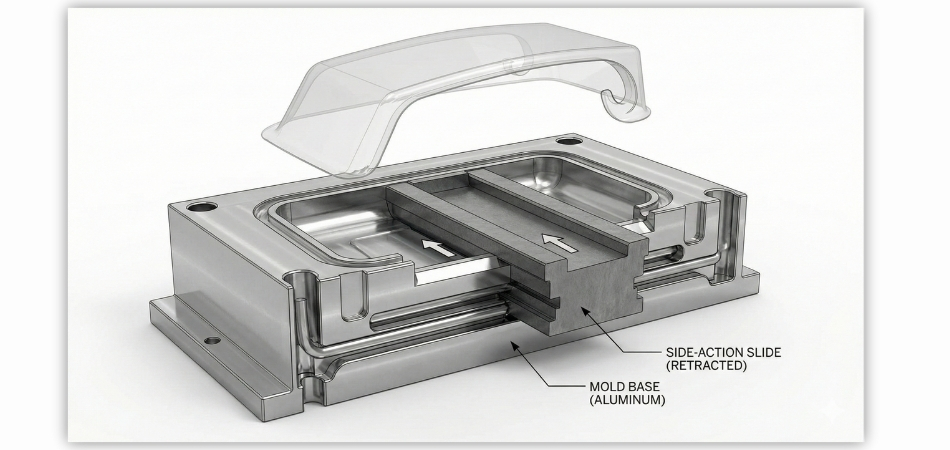
- Complex Tooling (The Expensive Route): We can build “smart molds” with pneumatic slides or articulating cores that move out of the way before ejection. This works beautifully for high-volume production, but it significantly increases your tooling costs.
- Loose Pieces (The Slow Route): We place a loose chunk of aluminum into the mold. It comes out with the part and is removed manually. This is effective for low volumes but slows down the cycle time.
- The BLG Strategy: Secondary Component Installation: Instead of trying to mold a complex undercut feature, mold it flat. Then, utilize our Secondary Component Installation service. We can install PVC, Metal, Wood, or Rubber components after the part is formed.
Need a complex mounting hook? Don’t mold it; let us bond a metal bracket post-process. This keeps the aluminum tooling simple (and cheap) while still giving you the functionality you need.
Rule 5: Draw Ratios and Webbing (The Draft Killer)
You can have perfect release angles on your walls, but if your Draw Ratio is off, you will get “webbing.”
Webbing is when the plastic sheet folds over on itself, usually at corners or between two tall features that are too close together.
Once a web forms, it creates a double-thickness fold that locks onto the tool geometry.
How to avoid it:
- Distance Rule: Keep tall features apart by at least 2x their height.
- Draft blending: Heavy draft helps prevent webbing. By angling the walls of those pockets inward (pyramid style), you allow the material to drape gently.
- Chamfered Corners: Sharp corners on the top of your mold are webbing magnets. Add a generous radius.
Since we handle Mold Creation via CNC in-house, we can often spot these “webbing traps” during the master pattern creation phase and suggest subtle geometry changes that save the part.
The Final Check: Don’t Gamble on Your Tooling Investment
So, take a hard look at that CAD model one last time: are you willing to bet your entire tooling budget that those textured walls will release cleanly, or is it time to let BLG’s engineering team take a look before we cut the mold?
If you are comparing fiberglass manufacturers for a US order, BLG handles the customs paperwork, duty treatment and freight into the US.
